
Every Dynamics 365 Finance & Operations developer knows the drill: whenever you need to implement a batch process or asynchronous operation using the **SysOperation framework**, you end up writing the same structural code repeatedly.
Creating a complete SysOperation pattern requires at least three distinct classes:
- Data Contract Class (`DataContractAttribute`, `DataMemberAttribute`, parm methods)
- Service Class (Business logic execution)
- Controller Class (`SysOperationServiceController`, `main` method, dialog settings)
While the framework itself is robust and essential, writing this boilerplate code manually is time-consuming and repetitive.
To solve this pain point in my daily workflow, I built **D365 Code Generator**—a lightweight, standalone Visual Studio 2022 extension designed specifically for D365 F&O developers.
🌟 What Makes D365 Code Generator Different?
Most D365 F&O tooling requires heavy environment bindings or local VM setups. **D365 Code Generator is 100% standalone.** It has no dependency on local Dynamics DLLs or local development environments, meaning it runs smoothly on any machine with Visual Studio 2022 installed.
Key Highlights:
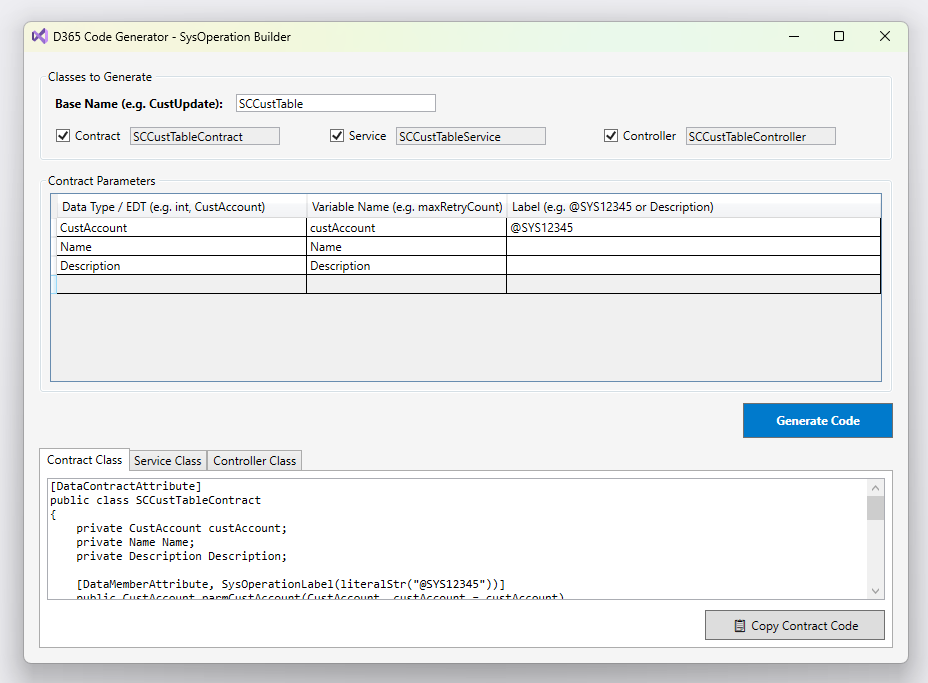
- Instant 3-Class Generation: Generates `Contract`, `Service`, and `Controller` classes simultaneously from a single base name.
- Dynamic Parameter Builder:Add parameters using EDTs, primitive types, custom variable names, and labels (`@SYS` IDs or literal text).
- Clean & Standard X++ Output:Produces clean, readable code adhering to Microsoft best practices.
- One-Click Copy: Easily preview each class in dedicated tabs and copy the generated code directly to your clipboard.
- Seamless Integration: Integrated right inside Visual Studio under `Extensions > D365 Code Generator`.
—
🚀 How It Works
Using the extension takes just a few seconds:
1. Open **Visual Studio 2022** and go to `Extensions > D365 Code Generator > SysOperation Builder…`.
2. Enter your **Base Name** (e.g., `CustUpdate`).
3. Add required parameters in the grid (e.g., `CustAccount`, `boolean`, `@SYS12345`).
4. Click **Generate Code**.
5. Switch between tabs (`Contract`, `Service`, `Controller`) and copy your ready-to-use X++ code.
—
**D365 Code Generator** is completely free and available now on the Visual Studio Marketplace.
👉 Download D365 Code Generator on Visual Studio Marketplace
👉 Github
Give it a try in your next D365 F&O project! If you have any feedback or suggestions for new features, feel free to reach out or leave a review on the Marketplace.
Happy coding!

